Protect your base from raids with money. While your base has paid protection time, damage from raiders is reduced.
HOW IT WORKS
– Protection is bought per cupboard. The money is spent only while the base is protected.
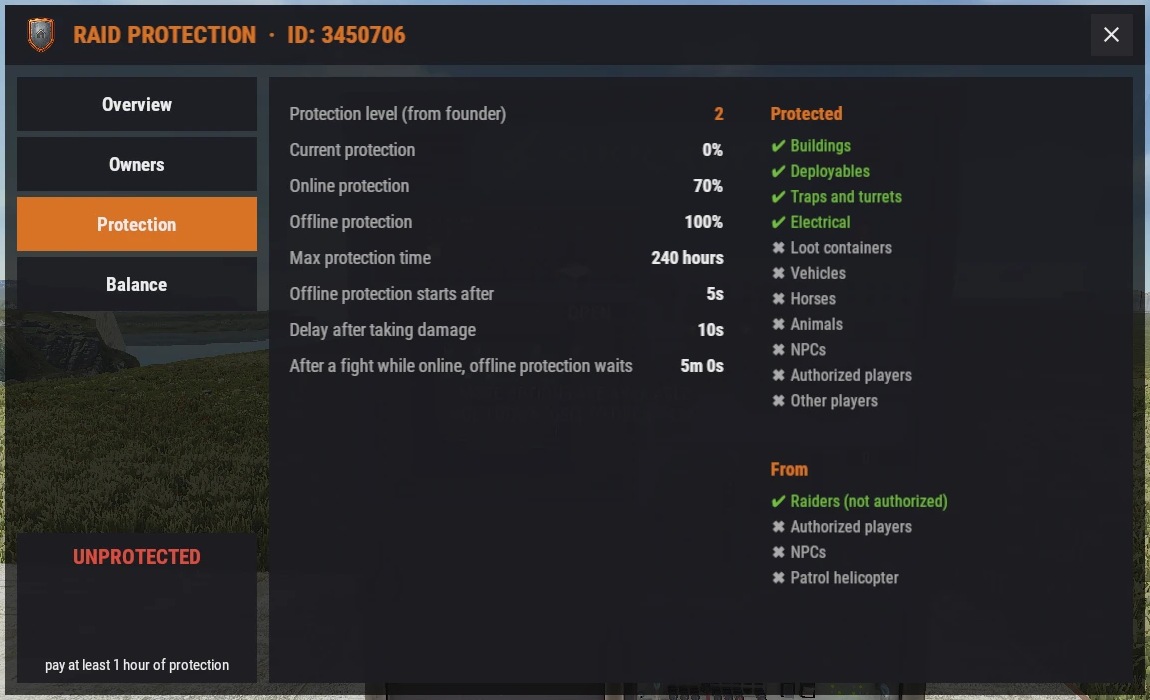
– Level 1 (everyone): 50% protection while an owner is online, 100% while all owners are offline.
– Level 2 (VIP): 70% online, 100% offline. Your cupboards get your level; when VIP ends they go back to level 1 (the balance stays).
– Owners = everyone authorized on the cupboard. Offline protection starts 5 seconds after the last owner leaves.
– Fought while online and then logged out? Offline 100% waits longer (up to 5 minutes), and every hit on the base while you are offline pushes it further. Logging out in the middle of a raid does not save the base.
HOW TO PAY
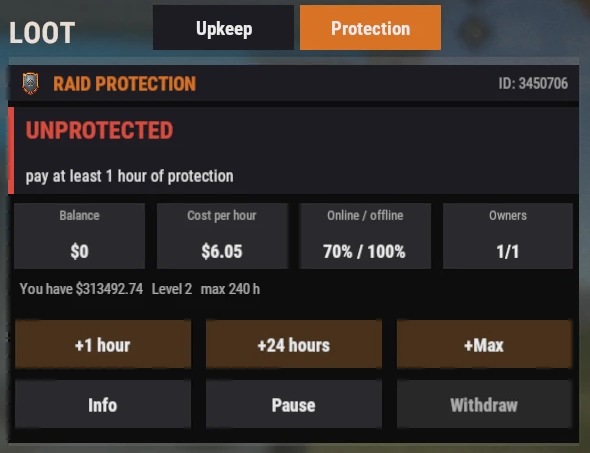
– Open the cupboard -> tab “Protection” (above the cupboard window).
– Buttons: +1 hour, +24 hours, +Max. The money is taken from your balance ($).
– Pause – stops protection and spending. Withdraw – returns the balance to you (protection turns off).
– Only players authorized on this cupboard can use the buttons. A raider who opens your cupboard cannot touch your money.
COST
– Cost per hour = base + per owner + per foundation. Bigger base and bigger team cost more.
– Level 1: max 120 hours paid ahead, level 2: max 240 hours. If the cost drops, extra balance is kept.
– When the balance ends, protection stops.
COMMANDS
– /pro – protection window of the cupboard you stand in (overview, owners, protection, balance).
– /lev – all protection levels and your level.
GOOD TO KNOW
– The bar at the bottom right shows “RAID PROTECTION” with the time left on your base, and “RAID PROTECTED” with the percent on someone else’s base.
– When you hit a protected base, a shield with the percent appears at the top right.
– Destroy a protected cupboard and you get 50% of its remaining balance.
.
