AdminWarn
AdminWarn
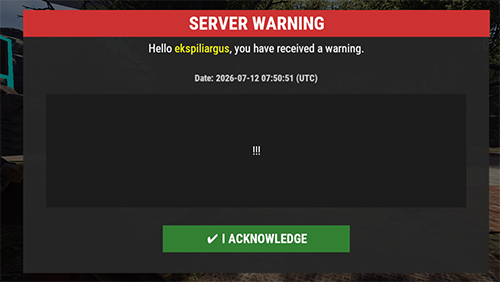
A full-screen GUI warning system for admins — send a warning to any player, online or offline, and it shows up as an unmissable popup they have to acknowledge. Every warning is automatically translated into each player’s own client language, so admins write it once and every player reads it in their language.
Key Features
/warn <player> <message>— sends a full-screen GUI popup, not just a chat line that scrolls away and gets missed. Works for offline players too: the warning shows automatically the next time they connect.- Auto-translation into the player’s own client language (English, Russian, German, Spanish, French, Hungarian, Italian, Polish, Ukrainian) via Azure Translator or Google Translate — write the warning once, every player reads it in their own language.
- Combat-safe delivery — if the target is in a fight when warned, the popup is queued and shown right after combat ends, so it never interrupts a firefight.
/warnall— broadcasts one warning to every player, online and offline, in a single command.- Duplicate-warning protection — the same admin/target/message combination within 5 seconds won’t send twice.
- Discord webhook logging when a player acknowledges a warning.
- Auto-clears old warning data on wipe (configurable).
- Console command mirrors (
warn/warnall/warnclearall) for RCON and server console use.
Commands & Permissions
| Command | What it does |
|---|---|
/warn <name or steamid> <message> |
Sends a warning to a specific player (online or offline) |
/warnall <message> |
Sends a warning to every player, online and offline |
/warnclearall |
Clears all saved/unread warnings |
Permission: adminwarn.admin — required for all three commands (chat and console versions).
Configuration
Auto-translation is optional and off by default ("Auto-translate warnings": false) — with it off, every player simply sees the warning exactly as the admin typed it, no API key needed at all.
To turn on auto-translation, set "Auto-translate warnings" to true and "Translation Provider" to either "Azure" or "Google", then fill in the matching key below it:
- Azure: create a “Translator” resource in the Azure Portal (a free tier is available), copy its Key into
"Azure Translator Key"and its Region into"Azure Translator Region"(leave"Azure Translator Endpoint"at the default). - Google: enable the “Cloud Translation API” in Google Cloud Console, create an API key, paste it into
"Google Translate API Key".
Other options: "Combat Delay Enabled" / "Combat Timeout (seconds)" control the fight-interrupt delay, "Discord Webhook URL" + "Discord Log Enabled" enable acknowledgment logging, "Translation Cache Time (hours)" controls how long translated strings are cached (default 168h / 7 days), "Clear data on wipe" auto-clears old warnings on a new map.
Requirements
Oxide or Carbon framework. Auto-translation is optional — the plugin works fully without it, and needs either an Azure Translator resource or a Google Cloud Translate API key only if you want that feature turned on.